

AmritaVD
A free program that downloads video and audio from YouTube, VK, Rutube, Twitch, Bilibili, SoundCloud and hundreds of other sites.
Paste a link, choose the quality and press Download. Nothing to install.
Download for WindowsThe program
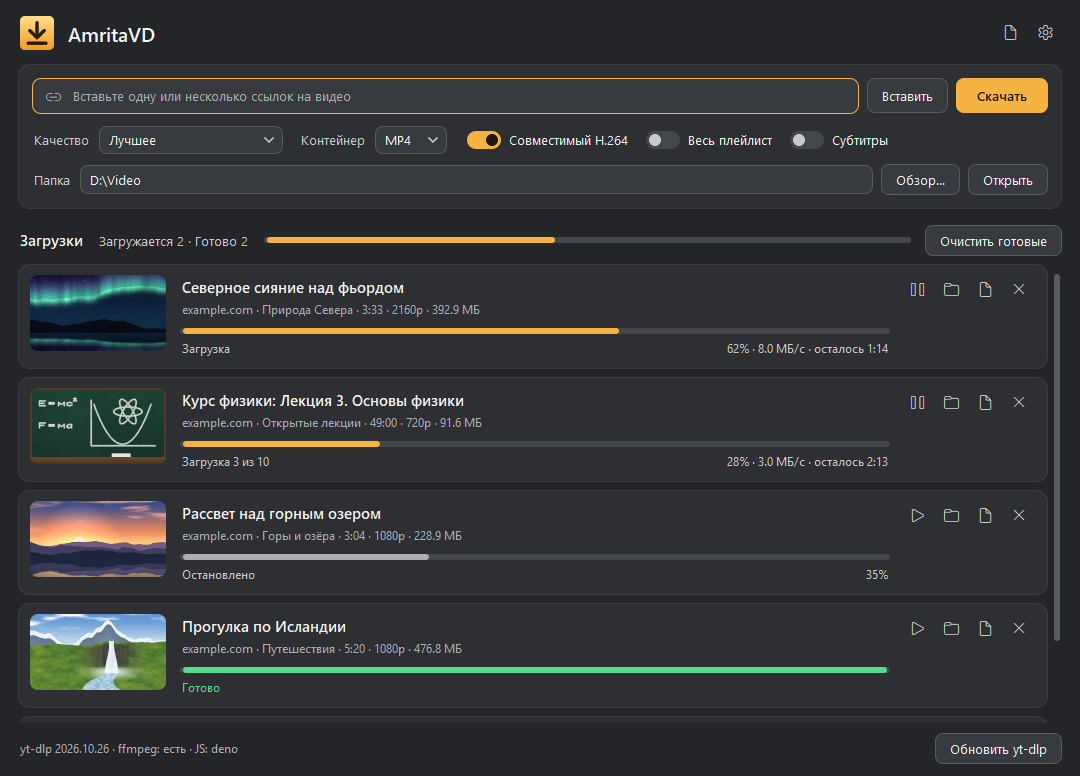
The queue in the picture is an example. The program’s interface is in Russian.
What it does
Hundreds of sites
YouTube, VK, Rutube, Twitch, Bilibili, SoundCloud and many others, plus direct links to files. Downloads run on yt-dlp.
The quality you choose
From 360p to 4K, or audio only: MP3, M4A or the original track.
Several links at once
Paste many links, even mixed with ordinary text. Up to five downloads run at the same time.
Stop and resume
Stop a download and continue it from where it stopped.
Playlists and channels
Each playlist or channel is saved to its own folder.
Subtitles
Russian and English subtitles are saved as separate SRT files.
Cookies and proxy
Browser cookies open video that needs a login. A proxy and a speed limit are in the settings too.
Clear messages
If a video won’t download, its card says why and what to try. The log has the details.
How to use it
- Download the archive and unpack it to any folder.
- Open the AmritaVD folder and start AmritaVD.exe. Keep it next to the bin folder.
- Paste one or several links and choose the quality.
- Press Скачать (Download) or Enter.
- Double-click a finished card to open the file. Right-click it for other actions.
Requirements
| System | Windows 10 or 11, 64-bit |
|---|---|
| Disk space | About 570 MB for the program, plus room for your video |
| Interface | Russian |
| Installation | Not needed: unpack the archive and start the program |
Questions
Windows says “Windows protected your PC”
The program isn’t signed with a paid certificate yet, so SmartScreen doesn’t know it. Click More info, then Run anyway.
A site stopped working
Sites change often. Press Обновить yt-dlp (update yt-dlp) in the program. It also tells you when a new version is out.
The site asks for a login or to prove you’re not a bot
Add cookies in the settings. Chrome and Edge often refuse to share them, so Firefox or a cookies.txt file work better. That file gives access to your account, so never share it.
The video isn’t available in my region
Try a proxy in the settings.
Why won’t it download paid streaming services?
They protect video with DRM. The program doesn’t download such video.
Can I stop and continue later?
Yes. Stop the download and resume it on its card. If you closed the program, add the same link with the same settings: unfinished files are kept for 14 days.
What may I download?
Only what you have the rights to: your own material, open licenses, personal copies where this is allowed.
Does the program send anything to the internet?
It connects only to the sites you download from and to GitHub, to check for a new yt-dlp version. Nothing is sent to AMVfeed.